Wednesday, July 10, 2019

Extracting PPP Password from Router Config Backup


When Exetel posted me the ZTE ZXHN H268A home gateway router, they were also supposed to supply me the PPP username and password, but they never did. And I was not about to give them a call because their support number queue is almost always 90+-person long. I thought, how hard can it be to get the piece of information straight from the router itself?

For one, there are utilities out there that can supposedly reveal or unmask the password hidden under those asterisks. Don't want to risk downloading malware, so ditched that option. Then again, what worked 10 years ago doesn't mean it'll still work now. I'm sure the web designers have gotten wise to this. I tried looking at the page source. For some reason, the info is not there. Pretty sure the info was sent, but just not being displayed in the source. Took some packet captures using Wireshark. This time I managed to get the username, but not the password. Very strange. Maybe that particular parameter was not being sent at all, since it's not required to be displayed on the webpage anyway Was about to dig deeper when I thought of something. Instead of searching for the password parameter, why not generate a configuration dump/backup and focus on that instead. The password should definitely be present in the backup file.

I was hoping for a plaintext XML file. Unfortunately, it was a binary config.bin. Loading it in an ASCII/hex editor revealed nothing. Now, some guys have tried to crack ZTE's config.bin. The theory is that the config backup file is encrypted using AES ECB using the device serial number as the key.

Did some more digging and found a utility called RouterPassView that managed to decrypt config.bin. It's able to decrypt a whole lot of other formats, too! Ah, what would I do without the internet.

Thursday, July 4, 2019

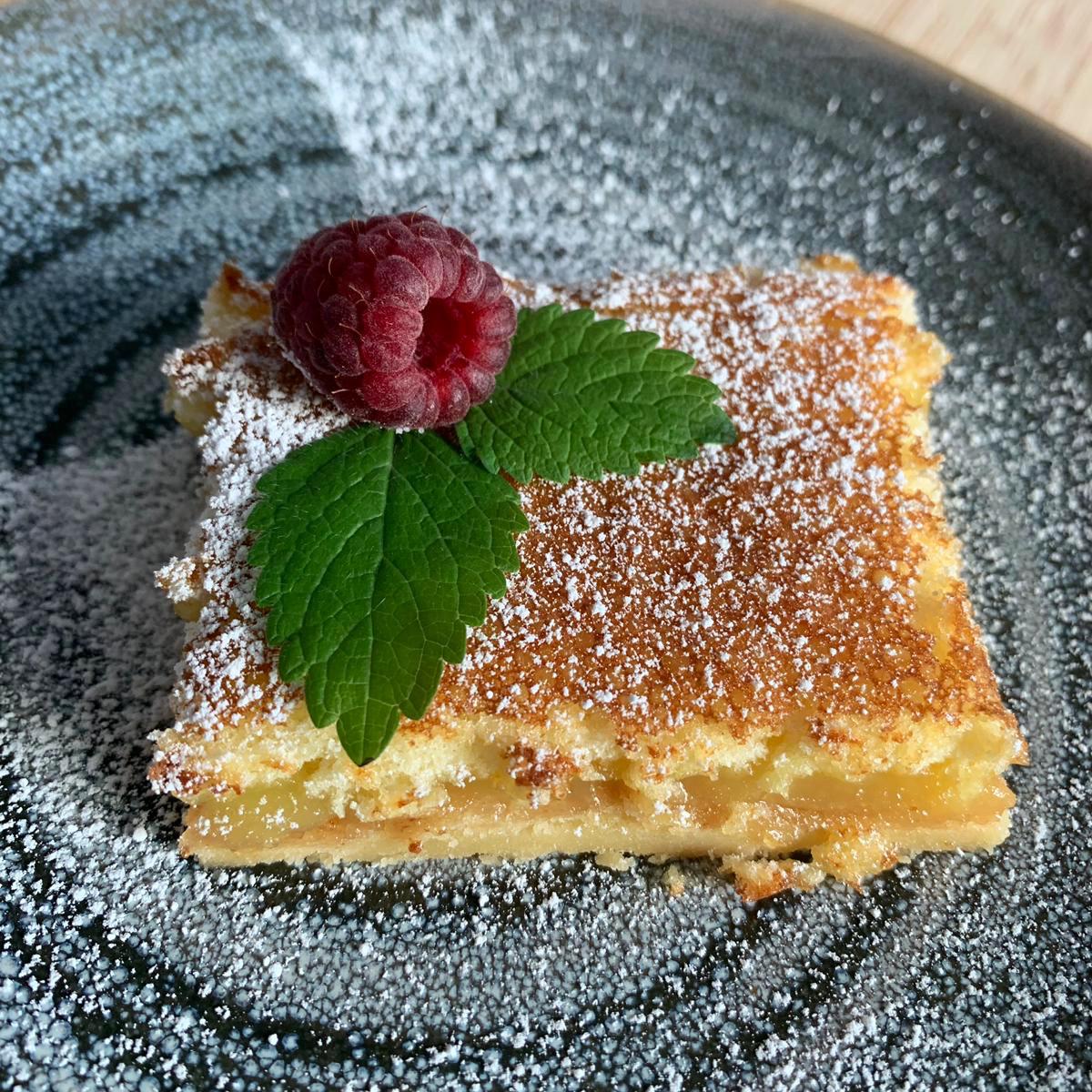
Lemon Bars from /r/Old_Recipes

Ingredients:

  • 2 cups flour
  • 1 cup butter or margarine
  • 1/2 cup powdered sugar

Cream and press into ungreased 9 x 12 pan.
Bake for 20 minutes at 350 degrees.

Beat 4 eggs, then add:

  • 5 - 7 tablespoons lemon juice
  • 2 cups sugar
  • 4 tablespoons flour
  • 1/2 teaspoon salt

Pour on baked crust.
Bake for 25 minutes at 350 degrees.
Sprinkle with powdered sugar while still warm.

Wednesday, July 3, 2019

Four-Ingredient Peanut Butter Cookies from /r/Old_Recipes

Ingredients:

  • 1 cup peanut butter
  • 1 cup sugar
  • 1 egg
  • 1/2 tsp vanilla


Mix thoroughly. Roll into small 2-inch balls. Place on ungreased cookie sheet. Press two ways with fork to flatten slightly.

Bake 350 degrees. 12-15 minutes. Makes 30.

A few tips:

  • Reduce baking time to 8-9 minutes for a softer cookie.
  • Do not remove from sheet for a couple minutes to prevent crumbling.
  • Roll into small 2 inch balls.

Thursday, June 27, 2019

TomTom Map 2019 Update

Been a few years since I last updated the maps on my TomTom PNDs. Not that I use them much these days (or at all), since it's more convenient to use Google Maps on my smartphone. I figure it's probably better to use a dedicated GPS unit when going on long drives, so might as well do a refresh.

Normally, I would update the NavCore on the unit, then install the latest map. Then I realized/remembered that since 2010, TomTom has switched the internal filesystem from FAT/FAT32 to Linux, thereby restricting external access to the device. As such, my XL330s and XXL TomToms are stuck with v9.530 with no hope of further upgrades. For the maps, I usually go to GPS Underground and NaviTotal to check out the latest maps available. On an aside, turns out the owner of GPS Underground is retiring, and is looking to sell the forum (vBulletin license and the domain name). Hopefully it stays around for a while longer. Would be sad to see it go, along with the collective knowledge accumulated over the years.

Before downloading any map, make sure that:

  • it's compatible with your device and/or NavCore version (check the compatibility matrix)
  • has the features that you want (TTS, ALG, and IQ Routes being the most important ones.)
  • the meta code is already available (or else the map won't work)


Simplest way to update the map:

  1. Connect the PND to a PC.
  2. Make a backup of the device.
  3. Delete the current map folder.
  4. Copy over the updated map folder.
  5. Update meta.txt with the associated meta code for the new map.
  6. Copy over the safety cam files from the backup if you have them.
  7. Run FastActivate.
  8. Profit.


I can't stress this enough. Always make a backup of the unit before performing any work on it. In my case, the folder structure got borked while transferring the new map and I ended up with garbage files and folders, which Windows can't even remove/delete. Solution? I had to format the whole drive and restore from backup.

In case FastActivate is not able to update your maps, make sure you're using the latest version of FastActivate. Another common issue for incomplete map errors (dct errors) is due to missing and/or wrong meta codes. If the integrated meta.txt file does not come with the meta code you need, insert the new ones into meta.txt. DO NOT manually add meta codes to integrated_meta.txt because in my experience, FastActivate won't read it.

Tuesday, June 25, 2019

Movie 2019.06.25 - Men in Black: International

Wasn't really expecting a new MIB installment. I mean, aside from men in black fighting aliens, are we expecting anything new here?

Well, they added some female actors for a start. Moving along with the times and all that. The movie also focuses on the London branch of MIB. So don't understand why it's called MIB: International instead of MIB: London. That way, they can do a different city every year. In any case, Chris Hemsworth is Aussie and Liam Neeson is Irish. International enough?

Now, let's talk about the movie itself. I've got one word for you: sloppy. Chris and Tessa waltz in, fresh from their Thor: Ragnarok high, and take a walk in the MIB park. I know it's hard to act when it's all green screen, and you're interacting with things that may or may not be there. But c'mon, put in some extra effort. I'm looking at you, Chris. Maybe he feels that after that stint with the Avengers, he deserved a break.

And a lot of the scenes in the movie are not really relevant to the plot - M's first visit to the London HQ and seeing all those aliens for the first time, the normal subway car transforming into a futuristic rail carriage, H's intro scene at the gambling den, etc. The CGI is pretty good, but in this day and age? Not enough. Could've worked 10 years ago, but aliens have lost their wow factor. There were some attempts at humour - H throwing the mini-hammer at the Tarantian goon a la Thor, references to the political incorrectness of the name Men in Black, etc. These are merely distractions and don't bring anything solid to the table. Pawny? A sidekick here and there would be helpful, but could've been done much better.

Yeah, things definitely went downhill for the franchise with the absence of Will Smith and Tommy Lee Jones. I guess Liam Neeson can see that, too, which might explain his unceremonious exit. Now that Aladdin is out, I say bring Will Smith back for the next installment, if there will be one.

Sunday, May 19, 2019

Windows 10 Blank Screen Showing Only Mouse Pointer

That's the best I can describe the issue.

I boot up my PC/laptop. It shows the blue Windows 10 logo with the spinning dotted circle below indicating that it's booting up. The logo goes away and normally the Windows desktop with the start screen and taskbar should show up. But this time, all I get is a blank screen. I jiggle the mouse a bit, and my mouse pointer shows up. So I know Windows is running, and it's not a screen issue.

What I did notice is that when I move the mouse, I can see that the pointer actually goes off-screen. This tells me that issue has something to do with the multi-display feature on Windows. Very possible that after a Windows update, the default screen was not set to my current display. So here's how to fix it.

Bring up the Project menu by pressing Windows key + P shortcut. You might not see it, as there's a chance it'll show up on the "main" display. Either way, just press the up or down arrow key a few times and press Enter.  If nothing happens, that's fine. It only means that you haven't selected the correct option. Keep trying a few times, until the desktop shows up on your display.

In my case, I'm the only user on my laptop and has configured auto-logon, so I don't need to log in to Windows. However, if your account is protected by a password, you'll have to log in first. You do this by pressing the spacebar or the Enter key or clicking the mouse, then typing in your password. This might be a difficult as you can't see the logon screen, but once logged in, you can follow the steps above to get back your desktop.

Thursday, May 9, 2019

Microsoft Surface Pro No Audio on Headphones

Watching YouTube video using Firefox browser on the Surface Pro with audio coming through the built-in speakers. Plugged in headphones on the 3.5mm audio socket. Audio stops from the speakers. No audio on the headphones. Unplugged the headphone, audio is back on the speakers. Strangely enough, this doesn't happen on my other laptops and tablets.

The theory here is that when Firefox is first started, it chose the built-in speakers as the default audio device. Play YouTube and it routes audio to the speakers. When you plug in the headphones, Windows add a second audio device and makes this the default audio device. However, Firefox is not aware of this and continues to send audio to the speakers, which are now muted by the introduction of the headphones. Most likely a hardware/firmware/driver issue somewhere?

In my particular case, this was fixed by shutting down Windows, plugging in the headphones, and booting up. Windows installed some updates during the reboot, so the issue might've been fixed with some new driver, or maybe it just needed a reboot.

A few things you can try if the above didn't work for you:

  • First of all, make sure the headphones are not the problem. You never know. Try them out on a different laptop (or phone).
  • Have a look at the headphone plug. Give it a clean if it's dirty.
  • When you plug in the headphones, does the audio device switch from speakers to earphones? Check by hovering or clicking on the audio/speaker icon. If it's still on speaker, right-click the audio icon, then Open Sound Setting. Choose earphones as the output device.
  • If that still doesn't work, try the "Troubleshoot sound problems" option. Windows will most likely reconfigure or reinstall or reset the audio driver, which should fix it.

Tuesday, May 7, 2019

Mom's Banana Cake

Ingredients:

  • 1½ cup all purpose flour
  • ¾ cup sugar
  • 2 eggs
  • 3 - 4 bananas (mashed)
  • ½ cup butter
  • 1½ teaspoon baking powder
  • ¼ teaspoon baking soda
  • ½ teasepoon salt
  • 3 tablespoons evaporated milk
  • 1 teaspoon banana flavour

Sift flour into a large bowl. Add in sugar. Make a well in the centre. Add in all the other ingredients. Stir until just combined. Pour into an 8"x4" pan. Line with baking paper if not non-stick.

Bake at 350ºF for 40-50 minutes or until  a skewer inserted into centre comes clean. Set aside to cool down.

Mom's Basic Chiffon Cake

With the chiffon cake, you basically have two parts - the egg yolk mixture and the egg white mixture (meringue). Mix the two and bake.

A few things to remember:
  • Used chilled eggs, instead of room-temperature ones. This results in a very smooth meringue without the need for cream of tartar.
  • Best to use a proper chiffon cake pan. Do not grease the pan, or the the mixture won't stick to the sides and can't rise as high.
  • For the same reason, do not use non-stick pans.
  • Let the chiffon cake rest upside down. This helps the cake maintain its height, instead of deflating.

Now, on to the ingredients.
For the egg yolk mixture:
  • 3 egg yolks
  • ⅓ cup sugar
  • ¼ cup cooking oil (vegetable or canola)
  • 5 tablespoons water
  • 1 cup and 2 tablespoons cake flour
  • 1 teaspoon baking powder
  • a few drops of vanilla
Whisk the 3 egg yolks together with the sugar until creamy pale yellow color. Slowly add the cooking oil. Then the water. Add in the sifted cake flour and baking powder. Keep whisking until thoroughly mixed.

For the meringue:
  • 3 egg whites
  • ¼ cup sugar
Whisk the egg whites using a hand mixer using medium speed until opaque and bubbly. Slowly add in the sugar. Mix using high speed until stiff peak is formed when whisk is lifted.

Next, fold in a third of the meringue with the egg yolk mixture and mix. Then the next third, then the last third.

Pour mixture into the chiffon pan. Bake at 350ºF for 40 - 45 minutes until ready.